Interactive World Map with Data Visualizations
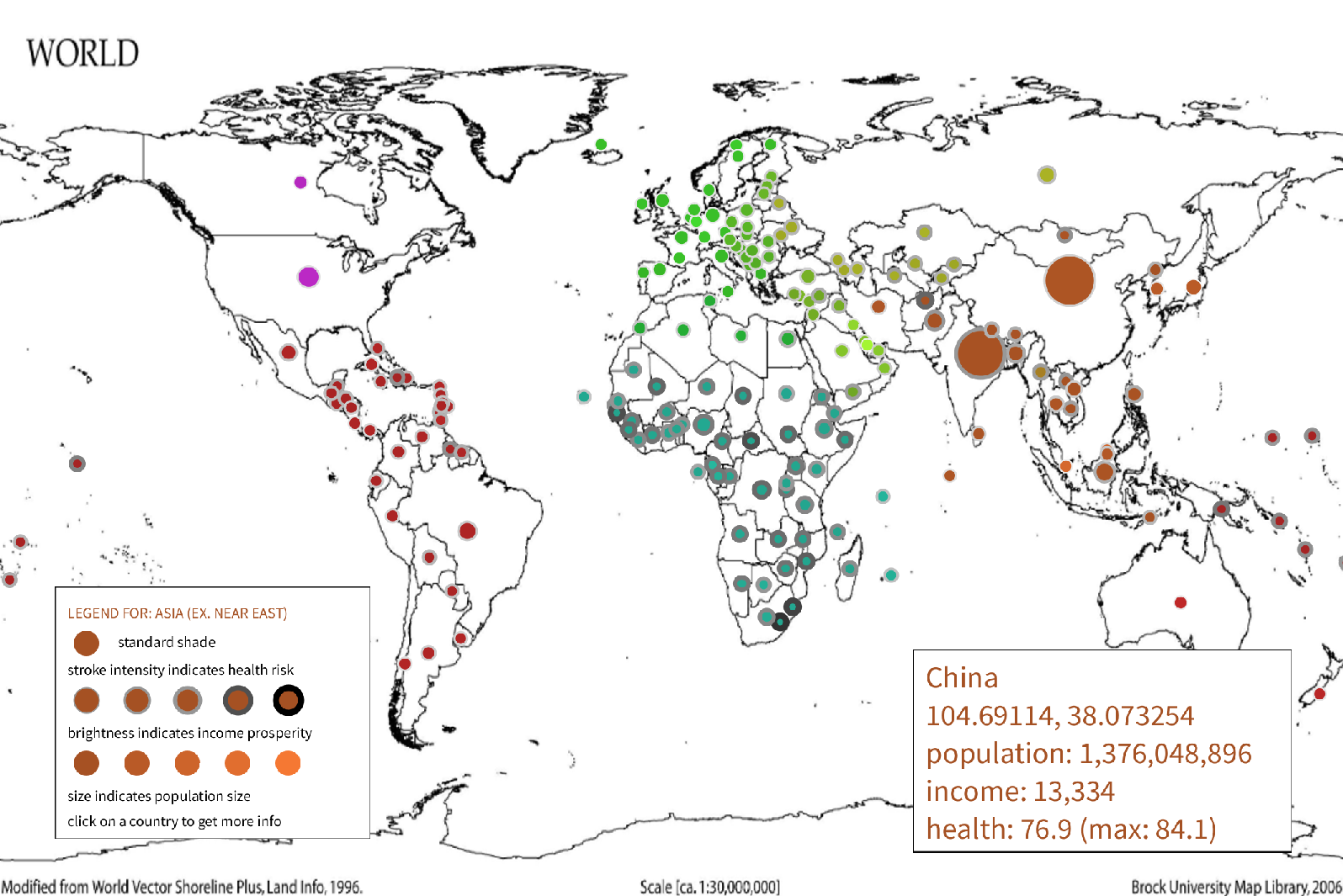
Data visualization of population, income and health
Interaction
- Click on a centroid: renders popup GUI displaying Gapminder data for that country.
- BACKSPACE: to close above popup GUI.
- Mousewheel: to zoom in/out on a world map.
- Zooming in/out is constrained.
- Clicking on the map while zoomed in also zooms out to avoid staying zoomed in.
- Clicking on a centroid while zoomed in makes an attempt to take a smaller radius but it is not fully accurate! For best results on clicking while zoomed in: zoom in aiming at a specific country, keeping your mouse always on that target country, and click.
In order to visualize the data provided by Gapminder on countries’ population, income and health, I wanted to utilize the most intuitive visual encoding for viewing countries, the world map. Initially, I wanted to model this onto a 3D globe that would rotate, but found that the 2D approach proved to be sufficient for the assignment's scope.
Thus, I used spatial encoding in order to map the centroid of the countries onto the screen, converting from long/lat pairs to on-screen coordinates within the screen size. See: plotGeoData() in data_vis.
As for visualizing the data from Gapminder, I used the following visual encoding channels:
- Size of centroid: proportional to population size
- Hue & Saturation of centroid: indicative of region
- Brightness of centroid: proportional to income
- Stroke weight and darkness of centroid: inversely proportional to health
In order to convert the Gapminder data entries for the above attributes into appropriate values for colors and strokes, I used the Math function, map(), in Processing. See: the functions in fetch_data with raw=false.
Note: the raw boolean refers to returning the raw data (raw=true), which are displayed in the popup GUI; or mapping it into a value to be applied in the color/size/stroke of the centroids (raw=false).
Sources
- Datasets: gapminder.csv and countries_filtered.csv, of which the latter includes central longitude and latitude data for all countries (centroids), provided by gavinr on GitHub
- Helper function for adding commas to big numbers: separate large ints - Oracle Forums
- Github link to CSV for countries’ centroids: gavinr/world-countries-centroids
- Processing forum discussion that aided my zooming in/out: zooming in/out - Forum.Processing
Leave a comment
Log in with itch.io to leave a comment.